
How to tell if a WordPress plugin is safe to install
There are roughly 60,000 plugins in the WordPress directory. Most are fine. A meaningful minority are abandoned, broken, insecure, or actively being used as supply-chain attack vectors. The trouble is they all look the same on the directory page.
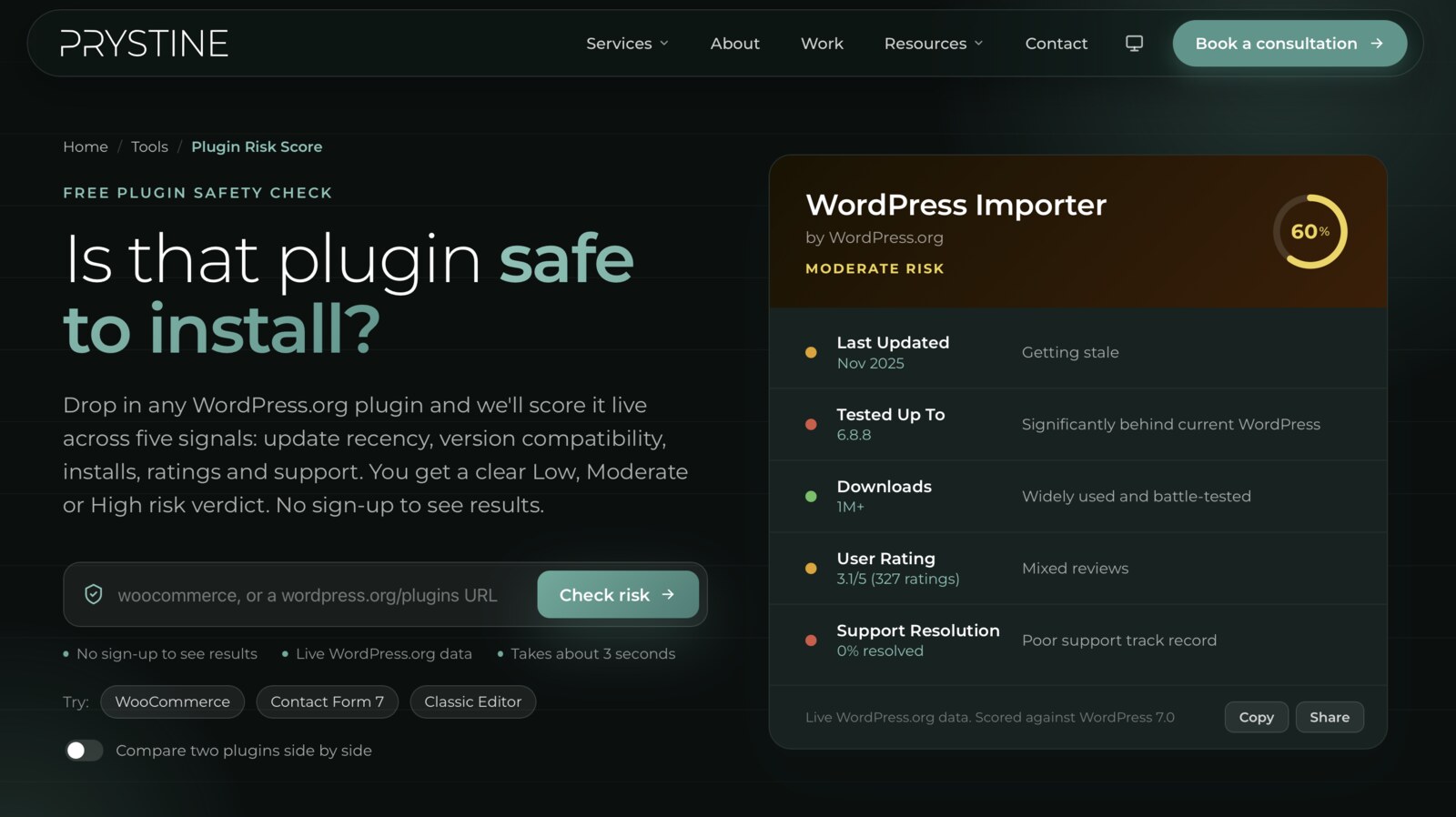
I run a WordPress agency, so I install a lot of plugins. I’ve also built a free tool that scores them automatically. This post is the manual version of what that tool does, plus the things the tool can’t easily see.
What makes a WordPress plugin risky?
Three categories, in order of how often they actually bite:
- Neglect. The author lost interest, moved on, or got hit by a bus. The plugin still works for now, but as WordPress evolves it breaks, and no one’s there to fix it.
- Quality. It works, but is poorly written — slow queries, conflicts with other plugins, no input sanitisation. Adds risk without ever announcing itself.
- Outright malice. Rarer, but real. Usually shows up after an ownership change: a popular abandoned plugin gets bought, the new owner pushes an update, and suddenly your site is serving spam links or leaking logins.
A useful vetting routine catches all three.
When was the plugin last updated?
This is the single best signal. WordPress ships a major release roughly every four to six months; a plugin that hasn’t been touched in two years has, at minimum, missed several rounds of API changes and security advisories.
Rough heuristic:
- Under 6 months — fine
- 6–18 months — keep an eye on it, but not a deal-breaker
- 18 months to 3 years — install with caution, look for an alternative
- 3+ years — assume abandoned; don’t install without a very good reason
The exception is plugins that are genuinely “done” — single-purpose tools that haven’t needed updates because nothing’s changed. They exist, but they’re rare. When in doubt, assume not-updated means abandoned.
Does it work with your version of WordPress?
The directory shows a “Tested up to” field. If it’s two major WordPress versions behind, the author isn’t actively maintaining it. The plugin might still work — it probably does — but you’re flying blind on compatibility.
The flip side: a freshly-updated plugin that says “Tested up to” the current WordPress version tells you the author is paying attention. That’s worth a lot.
How many sites are using it?
Active installs are a proxy for two things: how much pressure is on the author to maintain it, and how quickly bugs would be reported.
- Under 1,000 installs — small audience, slow bug reports, fewer eyes on it
- 1,000–10,000 — workable, especially with a responsive author
- 10,000+ — there’s a community keeping it honest
- 100,000+ — the plugin is well-known enough that problems get caught fast
Big install counts aren’t a guarantee of quality (some of the worst-behaved plugins are enormous), but they do guarantee scrutiny.
What do the reviews actually say?
Don’t just look at the star average. Look at recent one- and two-star reviews, and read the actual complaints. Patterns to watch for:
- “Stopped working after WordPress X.X update” — author isn’t keeping pace
- “Started showing ads after the last update” — ownership change, bad direction
- “Support never replied” — you’re on your own when something breaks
- “Free version is unusable, forces upgrade” — the premium-freemium trap
A 4.8 average with five recent one-star reviews all saying “broken after the update” is a worse signal than a 4.2 average with consistent praise. Recency matters more than the headline number.
Is the developer answering support?
The plugin directory has a support forum tab. Click it. Look at the recent threads. You’re checking three things:
- Are people posting? Active threads mean active users.
- Is the developer replying? Not to every thread, but to the recent ones.
- What’s the resolution rate? The directory shows it — “X of Y resolved” in the last two months. Below 50% is a warning sign.
A plugin with no support activity might just be very stable. A plugin with active threads and zero developer responses is one you don’t want to depend on.
The things a rubric won’t tell you
A scoring system can only measure what’s public on the plugin page. A few risks sit outside that:
Ownership changes. Check the changelog and author profile for signs the plugin has changed hands. Sudden new ownership of a popular plugin is the most common precursor to malicious updates. The handover usually happens quietly.
Vulnerability history. Run the plugin slug through the WPScan vulnerability database or Patchstack. One historical advisory that was patched promptly is fine. A pattern of repeat advisories is not.
The dependency you didn’t expect. Some plugins bundle other libraries — often outdated jQuery plugins, occasionally entire copies of other software. You can’t easily see this from the directory page, but if a plugin’s footprint feels too large for what it does, it probably is.
A decision frame
For each plugin you’re considering, run through:
- Last update under 18 months? ✅
- “Tested up to” within one major WordPress version? ✅
- More than 1,000 active installs? ✅
- Average rating above 4.0 with no recent pattern of complaints? ✅
- Developer responsive in the support forum? ✅
- No vulnerability history, or one cleanly resolved? ✅
- Same ownership as it had a year ago? ✅
Seven greens: install with confidence. Three or more reds: walk away, or find an alternative. In between, install on a staging site first and watch it for a week.
Or just automate the first five
The first five of those checks are mechanical — they read public data from the WordPress.org Plugin API and return a verdict. That’s what Plugin Risk Score does. Free, no account, paste a slug or URL and it scores against the same factors above. The last two — vulnerability history and ownership changes — still need a manual look.
The most useful thing about going through the checklist by hand once or twice, though, is that you start spotting the patterns on the plugin page yourself. After a while you can size up a plugin in about thirty seconds.
Which is roughly the time it takes to wreck a site with the wrong one. Worth the thirty seconds.